Office Printer Disposal Guide for Sydney Businesses
Updated 22 October 2026 by the Sydney City Rubbish team
An old office printer should never go into the general bin or a skip. Cartridges go to a dedicated recycling program, the printer itself goes to a specialist e-waste recycler, and any device with a hard drive needs certified data destruction before it leaves your floor. This guide sets out how a Sydney office does each of those steps properly, what to ask a recycler, and when a single booked collection is simpler than doing it piecemeal.
TL;DR
- Printers, copiers and multifunction devices are e-waste. Businesses need a professional recycler, because council e-waste drop-offs are for households, not commercial quantities.
- Cartridges, toner bottles and drum units never go in kerbside or office recycling bins. Use the free Cartridges 4 Planet Ark program.
- Ask any recycler for certified data destruction, compliance with AS/NZS 5377:2013 and an impact certificate you can use in ESG reporting.
- Shredded paper is a contaminant in yellow-lid recycling. Send it to general waste, or to a secure destruction service if the documents are sensitive.
- If you are clearing a whole floor, a single collection covering printers, furniture and other e-waste saves time and paperwork.
Table of Contents
- Why a printer is not ordinary office rubbish
- Step one: decide whether the printer can be reused
- Step two: remove consumables first
- Cartridges, toner and drums: the free national program
- The printer itself: use a commercial e-waste recycler
- Data security before the printer leaves
- Shredded paper and the paper that surrounds your printer
- Setting up your print room so disposal is easy
- Leasing as a way to avoid disposal altogether
- When to book a collection instead
- Working with building management and strata
- Promo: one booking for the whole clear-out
- A practical checklist for your next printer retirement
- FAQ
- Sources
Why a printer is not ordinary office rubbish
A multifunction printer looks like furniture, but it behaves like electronics. Inside are circuit boards, cabling, plastics, glass and metals. The NSW EPA notes that electronic waste contains valuable, recoverable materials such as aluminium, steel and copper, which can be turned into new products when the device is dismantled properly. In landfill, those materials are lost and the device becomes a pollution risk.
There is also a business risk. Modern printers and copiers often hold internal storage that keeps scanned documents, address books, network credentials and print queues. A device that walks out of the building without being wiped can carry client contracts, payroll records or staff details with it. For a corporate office, that is a privacy problem long before it is a waste problem.
Finally, there is the matter of who is responsible. In a commercial building, the building manager rarely handles tenant e-waste as part of standard operations, so disposal falls to the tenant. If you are the office manager, the facilities lead or the strata or property manager preparing a vacant tenancy, the obligation to arrange a compliant pathway sits with you.
Step one: decide whether the printer can be reused
Before you book anything, check whether the machine still has working life. A printer that works but no longer suits your volume can sometimes be redeployed to a smaller team, a storeroom or another site. If it is returned to a supplier at the end of a lease, the supplier takes it back and arranges its end-of-life handling.
If the printer is fully broken, outdated or surplus to a closing or relocating office, it moves to recycling. Do not leave it in a common area or loading dock with a note on it. Unattended devices disappear, and unwiped storage goes with them.
Step two: remove consumables first
Consumables are handled separately from the machine, and mixing them up is the most common mistake we see described in recycling guidance.
Unplug the printer, disconnect the cables and take out any remaining paper. Then remove the cartridges, toner bottles and drum units. These need their own pathway, covered in the next section. Remove any waste toner container, seal loose items in a bag so toner does not spill, and keep them upright where you can.
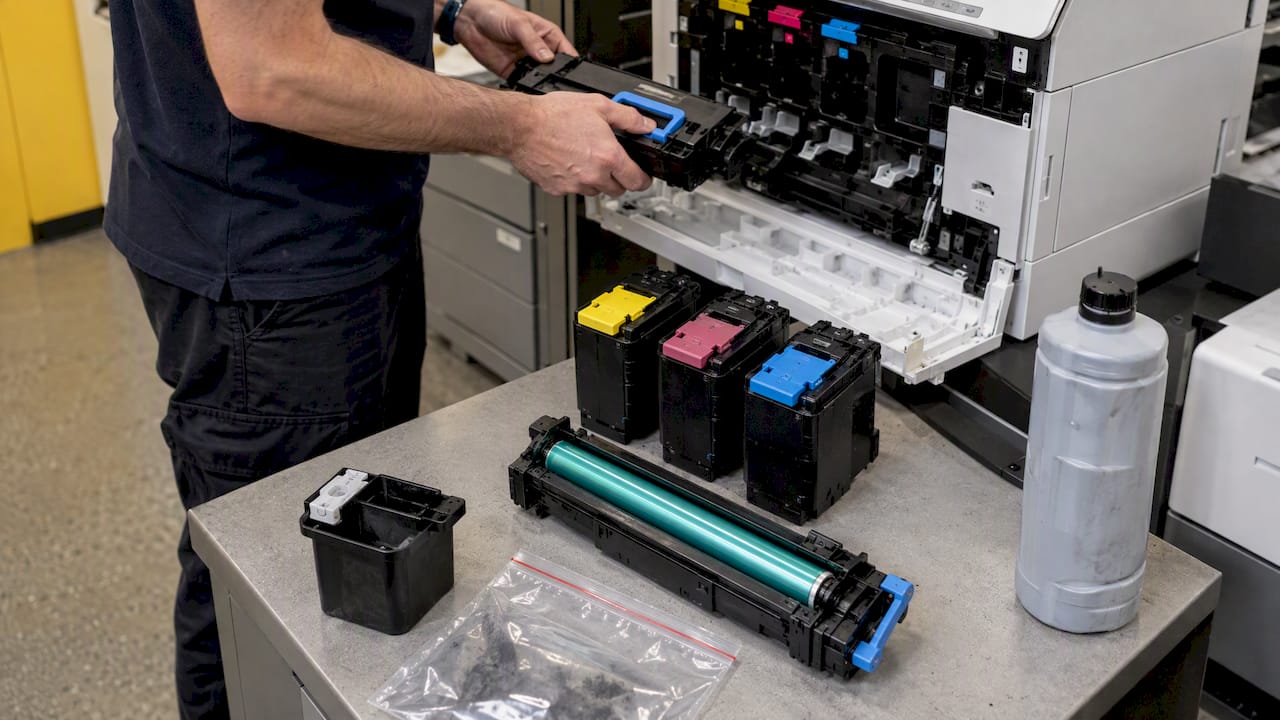
Keep the power cable, network cable and paper trays with the printer. Recyclers dismantle the whole unit, and loose accessories left behind in a cupboard simply become the next piece of clutter.
Cartridges, toner and drums: the free national program
Printer cartridges, whether inkjet, laser, toner bottle or drum unit, must not go into standard kerbside bins. The Cartridges 4 Planet Ark program is a free, accredited way to recycle them, and it reports that it has diverted more than 59 million cartridges from landfill since 2003, with a zero-waste-to-landfill guarantee.
There are two practical routes for a business.
The first is a public drop-off. Participating retailers accept used cartridges, including Officeworks, Australia Post, Harvey Norman, The Good Guys and JB Hi-Fi, according to the program. Store participation varies, so check the nearest location on Recycling Near You, which lists more than 1,500 public drop-off points nationwide.
The second suits busier offices. If your workplace uses more than three cartridges a month, the program offers a free workplace collection box. A box in the print room, emptied through the program, is far more efficient than sending a staff member to a shopping centre with a carton on the back seat.
Whichever route you use, ask for the program’s impact information. If your business reports on sustainability, the volume of cartridges diverted from landfill is a ready-made line in the annual report.
Why wish-cycling costs you more than it saves
Putting a cartridge in the recycling bin because you hope it will be recycled is known as wish-cycling. Planet Ark’s guidance warns that this kind of contamination can lead to whole loads of genuine recyclables being rejected, and that cartridges and e-waste are common offenders because they disrupt the mechanical sorting at recovery facilities. A single mislabelled bin in a shared building can affect everyone’s recycling.
The printer itself: use a commercial e-waste recycler
Households can use council e-waste events and drop-off points. Businesses cannot rely on them. Victoria’s sustainability agency states that these residential services exclude business and commercial quantities, and that businesses with larger volumes of printers, copiers and computers should use a professional recycler. Although that page comes from another state, the same logic applies to Sydney offices, and NSW supports e-waste recovery through the National Television and Computer Recycling Scheme, which is a regulation-plus-industry arrangement rather than a free-for-all drop-off for companies.
When you choose a recycler, three checks matter most.
Standards. Look for a vendor that complies with AS/NZS 5377:2013, the Australian standard for the collection, transport and treatment of e-waste. ISO 9001, 14001 and 45001 certification is a further sign of a well-run operation, and the NSW EPA’s Better Practice Guidelines for commercial and industrial facilities are the reference for how waste services should work in commercial buildings.
Data destruction. The Victorian guidance is blunt: standard recycling processes do not guarantee personal or corporate data security, so the recycler should supply certified data destruction. Ask whether it is done on site or at a facility, and whether you receive a certificate per asset or a single batch certificate.
Reporting. You should receive documentation showing what was collected, how it was treated and what was recovered. That paper trail is what protects you if a client, auditor or landlord asks later where your equipment went.
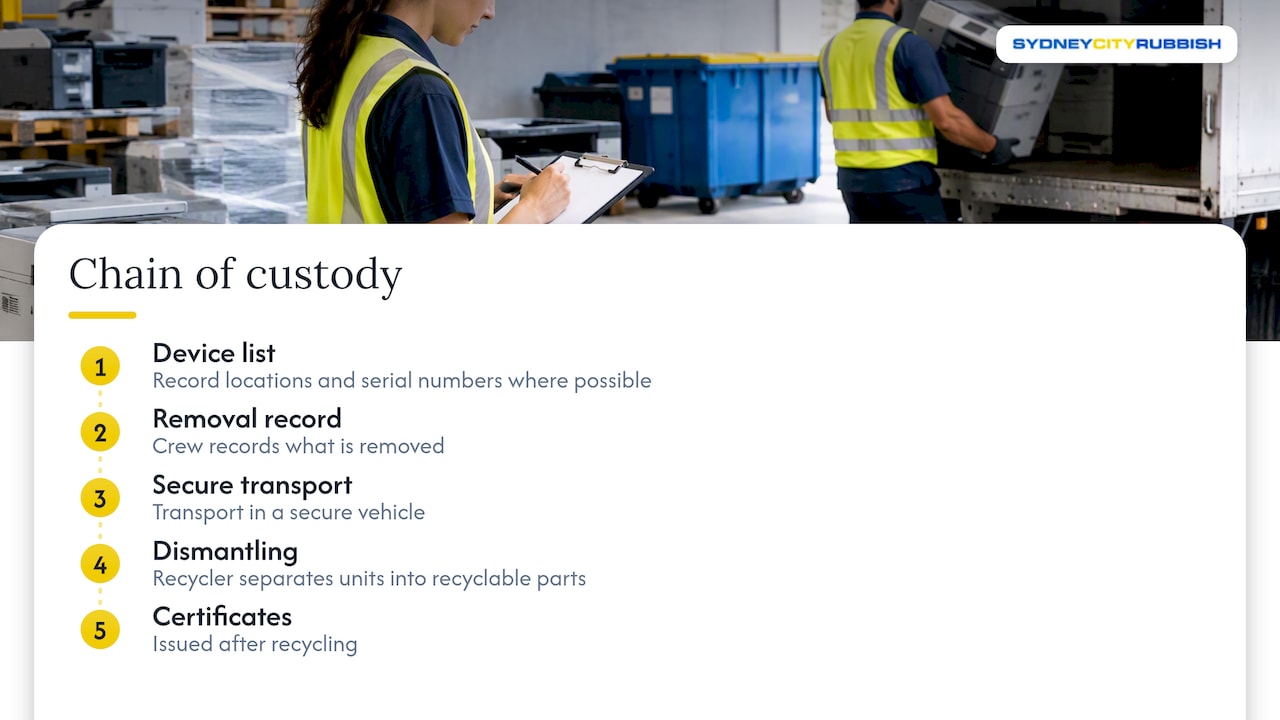
What a good chain of custody looks like
A collection should start with a list of the devices, their locations and, where possible, serial numbers. The crew records what is removed, transports it in a secure vehicle, and the recycler dismantles the units into recyclable parts. Certificates follow. If a recycler cannot explain those steps in plain terms, keep looking.
Data security before the printer leaves
Most small desktop inkjets store nothing sensitive, but larger multifunction devices often do. Treat any machine that scans, faxes, emails or holds user codes as a data-bearing asset.
Before collection, run the manufacturer’s factory reset, which clears address books, stored jobs and network settings. Remove any removable storage such as a hard drive or memory card, and have it destroyed rather than merely deleted. Note in your asset register which devices were reset, by whom and on what date. If your IT provider manages the fleet, ask them to confirm in writing.
A reset is a sensible first layer, not a substitute for certified destruction. The recycler’s certificate is the evidence you keep. For businesses that need asset-level proof, our page on business computer recycling in Sydney explains why asset-level certificates matter, and the same logic applies to printers with internal storage.
Shredded paper and the paper that surrounds your printer
Printers generate their own waste streams, and shredded paper is the one offices get wrong most often. Shredded strips are too small for sorting equipment to recover, so they are treated as a contaminant in yellow-lid recycling. Waste guidance from Western Australia says shredded paper should go to general waste, or to an organics bin where a local FOGO service accepts it. Rules differ between councils, so check the guide for the council that services your building before you decide.
If the shredded material was sensitive in the first place, such as contracts, HR files or financial statements, a secure document destruction service is the safer option because it provides a certificate and ensures the paper is processed correctly afterwards.
Unshredded clean paper is a different story. It belongs in paper-only bins placed near desks, printers and meeting rooms. Keep food and drink waste out of those bins, and keep cartridges out as well.
Setting up your print room so disposal is easy
The NABERS case study on winning the war against waste reports that office buildings with advanced practices use up to 11 distinct waste streams, compared with five in average buildings. You do not need eleven streams, but a print room is a good place to start separating them.
A tidy print room usually has a labelled paper-only bin, a cartridge collection box, a small secure container for confidential paper and a clearly marked corner for devices awaiting collection. Label each one and tell staff what goes where in a short email. Partitioned stations with clear signage cut cross-contamination, and they make your quarterly waste figures easier to explain.
One person should own the process. In most Sydney offices that is the office manager or facilities coordinator, who keeps the asset register, books collections and files certificates.
Leasing as a way to avoid disposal altogether
The NSW EPA’s better practice guidelines point to a longer-term fix: move away from owning office equipment. When you lease printers, end-of-life handling and hardware upgrades return to the supplier, so professional decommissioning and recycling are managed by the lessor rather than the tenant.
Leasing does not remove every task. You still need to confirm that the contract covers data wiping, removal on exit and recycling documentation. The same thinking applies to furniture, and this piece on office furniture decommissioning shows how facility managers can prove what was diverted from landfill when a fit-out is retired.
When to book a collection instead
Doing this yourself works for one or two machines. It becomes a burden when you are closing a floor, relocating, handing back a lease or replacing a whole print fleet. Then you may have printers, monitors, phone systems, desks, cabinets and boxes of paper all leaving together, and splitting them across drop-offs, couriers and skip bins costs more staff time than it saves.
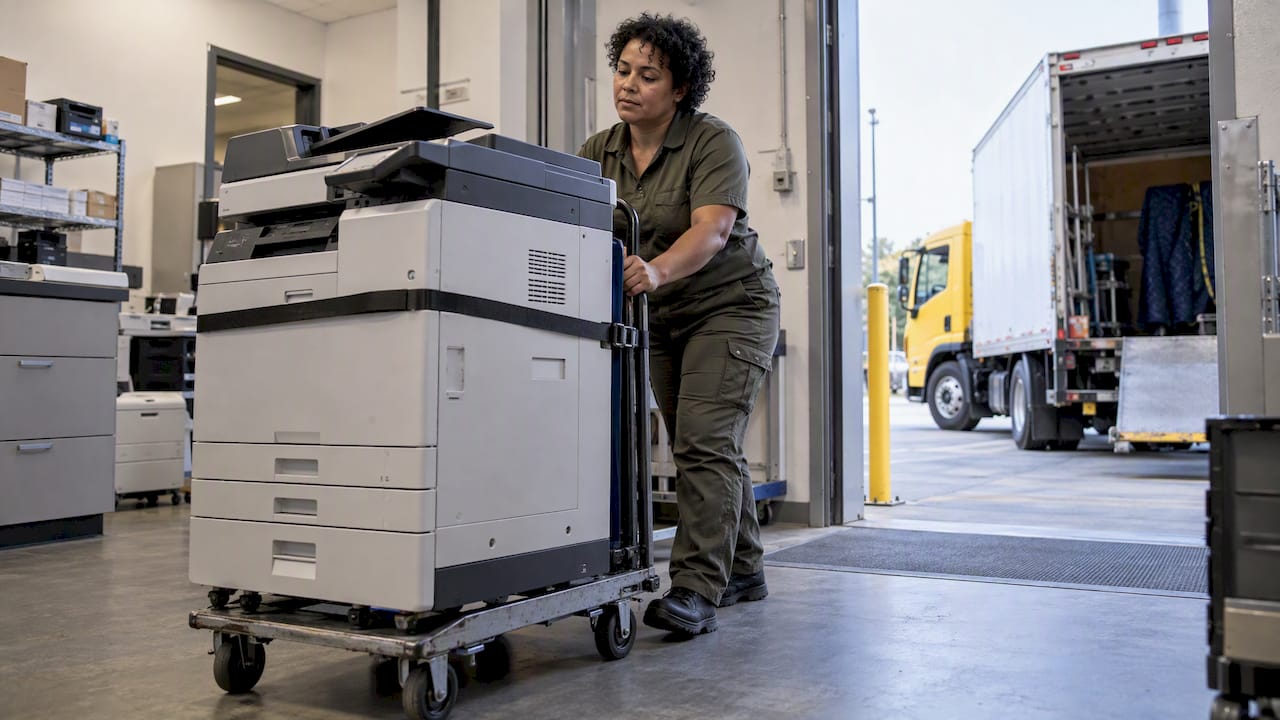
This is where a commercial collection earns its place. Sydney City Rubbish provides printer disposal and recycling in Sydney, and we also collect wider e-waste from Sydney offices, including computers, monitors, screens, laptops and phone systems. Where the job is a whole-office clear, our office cleanout and junk removal service handles furniture and equipment together, and we coordinate directly with building management for access, which matters in towers with loading dock bookings and lift restrictions.
Working with building management and strata
In a multi-tenant building, removing equipment is rarely as simple as wheeling it to the street. Loading docks are scheduled, lifts may need protection, and some buildings require insurance certificates or after-hours access. Raise the job with building management early, give them the date and the approximate volume, and confirm the lift and dock arrangements in writing.
Strata managers and property managers clearing a vacated tenancy face an extra question: who owns what was left behind. Settle that in writing before anything is removed, and keep a list of what was taken and where it went. If an e-waste item is found in a common area, it is still e-waste, and still needs a compliant pathway.
Promo: one booking for the whole clear-out
If your office has printers, e-waste and furniture to move, we can quote the whole job together. Sydney City Rubbish removes electronic waste, furniture and other office items for corporate, retail, construction and strata clients across Sydney, with fast electronic quoting and an optional carbon-neutral disposal pathway. See our commercial office rubbish removal service or get a free quote and tell us what you need removed.
A practical checklist for your next printer retirement
Start by listing every device to be retired, with its location, make and whether it holds storage. Decide whether any are reusable. Run a factory reset, remove storage media and record it. Take out cartridges and send them to the Cartridges 4 Planet Ark program. Gather cables and trays with the unit. Brief building management on the collection date. Book a recycler that meets AS/NZS 5377:2013, provides certified data destruction and gives you an impact certificate. File the certificate with your asset register and sustainability records.
That sequence takes an afternoon of preparation for a small office. For a larger one, the preparation is the same, but a collection partner carries the lifting, transport and paperwork.
FAQ
What’s the best way to get rid of an old office printer?
Wipe or remove any storage, take out the cartridges, then send the unit to a specialist e-waste recycler that gives you a data destruction certificate. Businesses cannot rely on residential council e-waste drop-offs. For a single machine, a booked collection is usually quicker than transporting it yourself.
Can I put printer cartridges in the office recycling bin?
No. Cartridges, toner bottles and drum units should never go in kerbside or standard recycling bins. Use the free Cartridges 4 Planet Ark program through a participating drop-off point, or request a workplace collection box if you use more than three cartridges a month.
Why can’t you put shredded paper in the recycling bin?
Shredded paper is too small to be recovered by sorting equipment, so it counts as contamination. It should go to general waste, or to an organics bin where your council accepts it. If the documents were sensitive, use a secure document destruction service instead.
Does Australia Post recycle printer cartridges?
Participating Australia Post outlets accept used cartridges under the Cartridges 4 Planet Ark program, alongside retailers such as Officeworks and JB Hi-Fi. Because participation varies by store, check the closest location on Recycling Near You before you go.
Sources
- Cartridges 4 Planet Ark
- Recycling Near You: printer cartridges
- Business e-waste recyclers, Sustainability Victoria
- E-waste, NSW EPA
- Reducing business waste materials fact sheet: Electronic waste, NSW EPA
- Better Practice Guidelines for Waste Management and Recycling in Commercial and Industrial Facilities, NSW EPA
- Materials, Watch Your Waste
- A greener way to spring clean, Planet Ark
- Case study: winning the war against waste, NABERS